


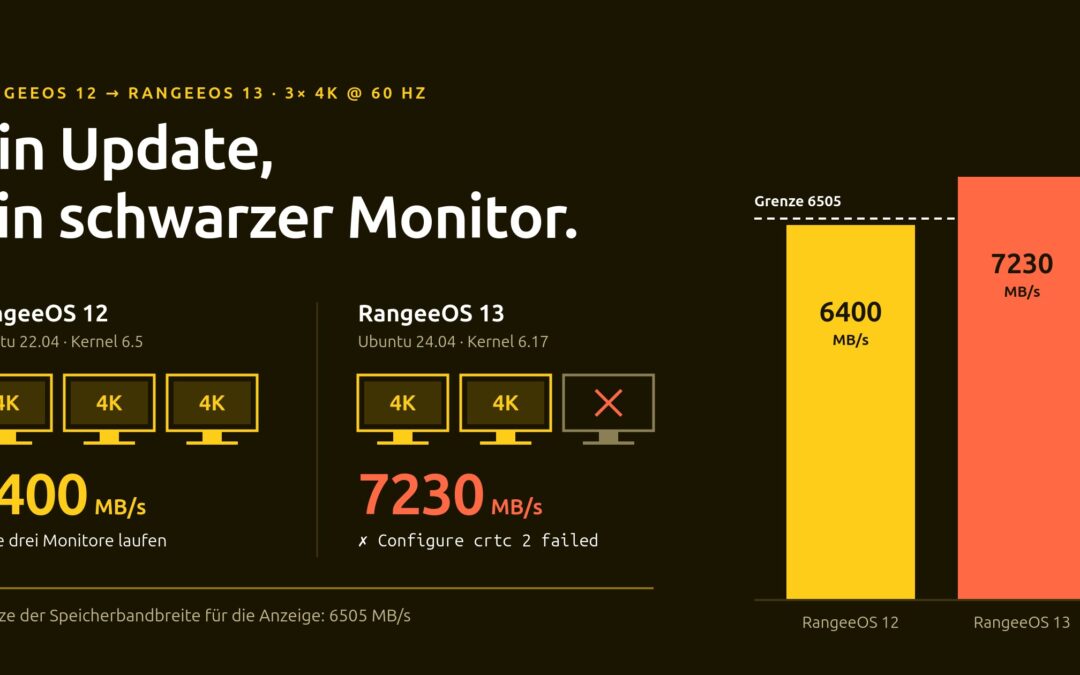
Three 4K monitors running at 60 Hz connected to a compact thin client: This wasn’t a problem under RangeeOS 12. After switching to RangeeOS 13, however, the third screen suddenly went black with the same configuration. Ultimately, this seemingly minor issue was caused by two factors that reinforced each other. Here, we’ll show you how we identified them and what can be done to fix the problem.
In short: In RangeeOS 13, IOMMU (Intel VT-d) is enabled by default, and the graphics driver then calculates 5% more memory bandwidth. On some devices, the Linux driver also selects a 4K mode for HDMI, which requires more bandwidth. The first issue can be disabled through configuration; the second will be corrected in the next generation of RangeeOS.
The symptom
When setting up the three monitors, the RangeeOS 13 display configuration fails:
XRandR fehlgeschlagen: XRandR returned error code 1:
b'xrandr: Configure crtc 2 failed\n'
„crtc 2“ is the third display pipeline — that is, the third monitor. The debug log from the Intel i915 graphics driver provides more insight:
icl_find_qgv_points: No QGV points provide sufficient memory bandwidth 7230
for display configuration(3 active planes).
Before making any changes, the driver checks whether the system memory provides enough bandwidth for all displays. On our devices with Intel Alder Lake-N, the limit is 6505 MB/s. RangeeOS 13 reached 7230 MB/s, while RangeeOS 12, using the same monitors, reached 6400 MB/s.
The test setup: RangeeOS 12 and 13 replicated with Ubuntu
RangeeOS is based on Ubuntu LTS: RangeeOS 12 is based on Ubuntu 22.04 with kernel 6.5, and RangeeOS 13 is based on Ubuntu 24.04 with kernel 6.17.
For troubleshooting, we needed systems on which we could freely take measurements, swap kernels, and change boot parameters. That’s why we set up two test devices with identical hardware: one running Ubuntu 22.04 as a stand-in for RangeeOS 12, and one running Ubuntu 24.04 as a stand-in for RangeeOS 13, each with the exact kernel corresponding to its respective RangeeOS version. We then cross-checked the results on a real RangeeOS 13 system.
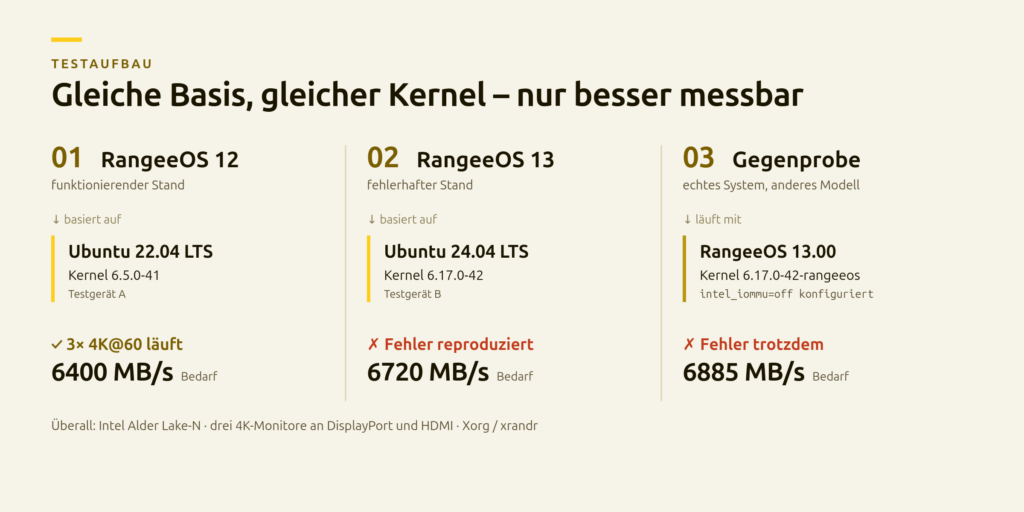
Ubuntu 22.04 ran smoothly with three 4K monitors, but Ubuntu 24.04 Configure crtc 2 failed crashed. The cause was, therefore, in the shared Ubuntu base and not in RangeeOS itself.
Even under RangeeOS 12, however, it was a close call. A 4K image at 60 Hz requires about 2,133 MB/s per monitor; three monitors total 6,400 MB/s. That left only 105 MB/s to the limit—a mere 1.6%.
Reason 1: IOMMU is now enabled by default
Our initial suspicion was that the bandwidth calculation in the driver had changed. However, a comparison of the i915 code in kernels 6.5 and 6.17 showed that the calculation is the same in both versions.
The kernel configuration has changed. Ubuntu has been building its kernels with this feature since version 6.8. CONFIG_INTEL_IOMMU_DEFAULT_ON=y. As a result, IOMMU (Intel VT-d) is enabled by default starting with Ubuntu 24.04 and also in RangeeOS 13. In this case, the driver adds a flat 5% to the bandwidth requirement on newer Intel graphics units. The relevant section in intel_bw.c (Kernel 6.17):
if (DISPLAY_VER(display) >= 13 && i915_vtd_active(i915))
        data_rate = DIV_ROUND_UP(data_rate * 105, 100);
This brings the speed from 6,400 to 6,720 MB/s, which is above the limit. With IOMMU disabled, kernel 6.17 returns exactly the same values as 6.5, and all three monitors are running.
Reason 2: When connected via HDMI, the driver selects the higher-resolution 4K mode
On some devices, the error also occurred with IOMMU disabled, in which case the speed was 6885 MB/s. The reason lies in the mode selection, as 4K at 60 Hz comes in two variants: the power-efficient CVT-RB mode with a 533 MHz pixel clock (2133 MB/s) and the CEA-compliant TV mode with a 594 MHz pixel clock (2376 MB/s), which requires 11% more power.
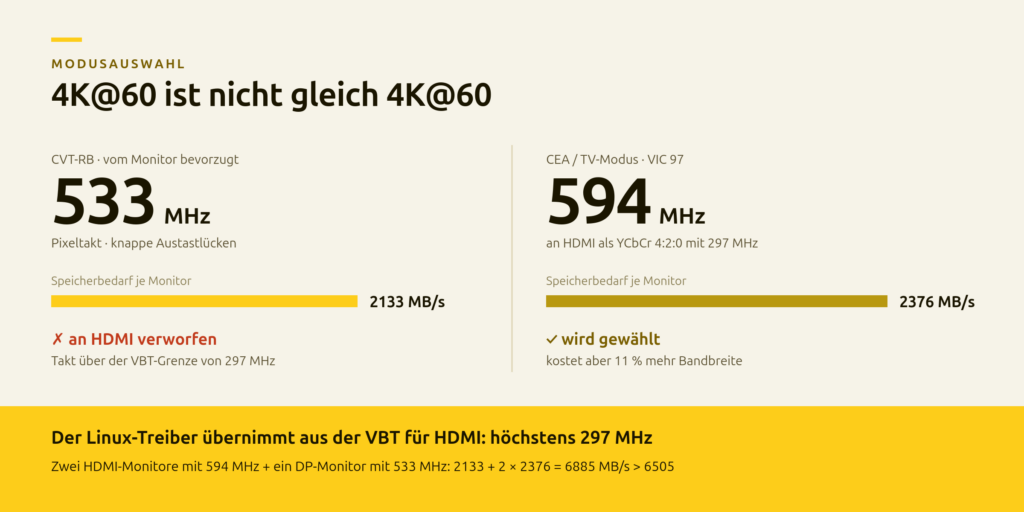
The i915 driver reads an upper limit of 297 MHz for HDMI from the Video BIOS Table (VBT), a configuration table for Intel graphics, and strictly adheres to it. It therefore disregards the 533-MHz modes, even though the monitors support up to 600 MHz. What remains is the 594-MHz mode, which HDMI transmits as YCbCr 4:2:0 at half the clock speed. For bandwidth purposes, however, the full pixel clock still applies, since the graphics card continues to read the entire image from memory. With one monitor connected via DisplayPort and two via HDMI, this results in:
- without VT-d: 2133 + 2 × 2376 = 6885 MB/s
- with VT-d: 6885 × 1.05 = 7230 MB/s, exactly the value from the error message
It’s striking that the same devices run without any issues on three 4K monitors under Windows. We’ve also observed this behavior on different devices. So it’s not due to a single device, but rather to how the Linux driver interprets this information from the graphics platform. In our test, we raised the limit to 594 MHz: The driver then sets all three outputs to 533 MHz, the bandwidth requirement drops to 6400 MB/s, and all three monitors work. The test results are identical in kernels 6.5 and 6.17 and are therefore not dependent on the RangeeOS version.
All values at a glance
|
|
|
|
|
| ConfigurationRequirementsResult |
|
|---|---|---|---|---|---|---|
| RangeeOS 12 / Kernel 6.5, 3× 533 MHz | 6400 MB/s | ✓ is running | ||||
| RangeeOS 13 / Kernel 6.17, VT-d activ (standard), 3× 533 MHz | 6720 MB/s | ✗ Error | ||||
| Kernel 6.17, IOMMU off, 3× 533 MHz | 6400 MB/s | ✓ is running | ||||
| RangeeOS 13, IOMMU off, HDMI max. 297 MHz | 6885 MB/s | ✗ Error | ||||
| the same with VT-d (standard) | 7230 MB/s | ✗ Error | ||||
| HDMI limit test 594 MHz, IOMMU off | 6400 MB/s | ✓ is running |
The solution
VT-d-surcharge: The IOMMU can be disabled in RangeeOS 13 through configuration (intel_iommu=off). We explain how to do this in the German KB article Dritter 4K-Monitor bleibt schwarz – IOMMU abschalten. The graphics driver thus disables DMA isolation, just as it does in RangeeOS 12. On devices where the HDMI limit does not apply, all three 4K monitors will work again.
HDMI limit: For the upcoming generation of RangeeOS based on Kernel 7.0, we have prepared a modification to the i915 driver. It allows us to selectively bypass the HDMI limit set by VBT on a per-device-model basis, making the power-efficient 533-MHz mode available where it has been proven to work. The modification is currently in the build and testing phase.
We deliberately chose not to simply make the bandwidth calculation look better than it is. The storage would still have to deliver the same amount of data, and there is a risk of image distortion.
Conclusion
The error did not have a single cause. A change in a standard within the Ubuntu base and a strict HDMI limit in the Linux driver depleted a reserve that had already been as low as 1.6%. The fact that RangeeOS is built on Ubuntu LTS made the investigation much easier: On open test systems, the error could be reproduced, measured, and clearly identified.
If you are running multiple 4K monitors on RangeeOS 13 and encounter this error, first disable IOMMU as described in the KB article. If the error persists, the HDMI limit on your device is causing the issue. In that case, please contact our support team for assistance.